

Originally Published: Mar 04, 2018
As of February 1 2018, acac has transitioned to a new software system for member management, online program registration, class sign-ups, and more.
You are now eligible to create your new online login!
Please see below for more information on the following topics:

How to Create a Member Account
NOTE: you must use your name and email address on file with acac to create a new account. Not sure what it is? Give your club location a call or visit Member Services to get started.
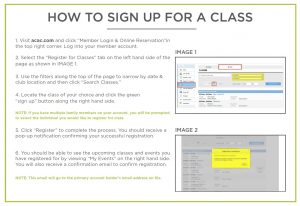
How to Register for a Group Exercise Class
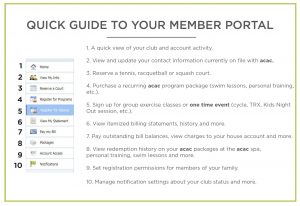
A Basic Guide to Your Member Portal
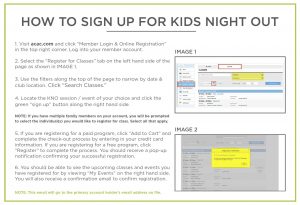
How To Sign Up for Kids Night Out
acac Mobile App
Download the acac mobile app to access your member account, check-in with a digital scantag, view statements, sign up for classes, and more. Visit your device’s app store and search “acac Fitness & Wellness” to get started!

. . .
Questions? We’re here to help! Call your nearest club location or fill out a contact form here.